


Applications that are distributed with shareware methods usually have time limits in its use and if the time limit is up then the user must activate the application by registering or purchasing a license to the owner of the application by way of mentioning the serial number on an existing application.
There are also types of shareware are not using a time limit, but place restrictions on facilities that can be used. Even some that do not use time limits or restrictions on the facility, but will always be applications that use display ads at the time the application is used.
When the owner receives the registration application or payment of the user who wants to do the activation, then the owner of the application will send the activation key to users to be included on the form provided on the application of activation used.
If you are the owner of the application you do not want activation key can be used by several different users to knowingly duplicate application for personal gain, this can be handled by creating a different serial number for each different user (one user of the serial number) so that the activation key can only be used by one user only.
To create a serial number unique to each user we can use the serial number contained on the disk, so any applications that are installed on different computers it will have a different serial number.
Example of application serial number and activation key by using the serial number contained on the disk can be seen in the example the following program
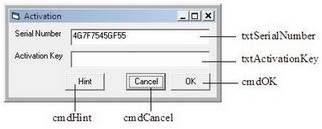
[sourcecode language="vb"]
Option Explicit

Private Declare Function GetVolumeInformation Lib �Kernel32? _
Alias �GetVolumeInformationA� (ByVal lpRootPathName As String, _
ByVal lpVolumeNameBuffer As String, _
ByVal nVolumeNameSize As Long, _
lpVolumeSerialNumber As Long, lpMaximumComponentLength As Long, _
lpFileSystemFlags As Long, ByVal lpFileSystemNameBuffer As String, _
ByVal nFileSystemNameSize As Long) As Long

Private Function GetHDDSerialNumber(ByVal DriveLetter As String) As String
Dim SN As Long
Dim VolumeNameBuff As String
Dim FileSystemBuff As String

VolumeNameBuff = String$(255, Chr$(0))
FileSystemBuff = String$(255, Chr$(0))
GetVolumeInformation UCase(DriveLetter) & �:\�, _
VolumeNameBuff, 255, SN, 0, 0, FileSystemBuff, 255
GetHDDSerialNumber = Trim(Hex$(SN))
End Function

Private Function CreateAppSerialNumber _
(ByVal HDDSerialNumber As String) As String
Dim i As Integer
Dim temp As String
Dim temp2 As String

temp = Empty
For i = 1 To Len(HDDSerialNumber) Step 2
temp = temp & Mid(HDDSerialNumber, i + 1, 1) & _
Mid(HDDSerialNumber, i, 1)
Next

For i = Len(temp) To 1 Step -1
Select Case Asc(Mid(temp, i, 1)) + 1
Case 48 To 57, 65 To 90, 97 To 122
temp = temp & Chr(Asc(Mid(temp, i, 1)) + 1)
Case Else
temp = temp & Mid(temp, i, 1)
End Select
Next

For i = 1 To Len(temp) Step 2
temp2 = temp2 & Mid(temp, i, 1) & _
Mid(temp, Len(temp) \ 2 + i, 1)
Next

CreateAppSerialNumber = temp2
End Function

Public Function CreateActivationKey _
(ByVal AppSerialNumber As String) As String
Dim i As Integer
Dim j As Integer
Dim temp As String

temp = Empty
For i = 1 To Len(AppSerialNumber) \ 2
temp = temp & (Asc(Mid(AppSerialNumber, i, 1)) Xor _
Asc(Mid(AppSerialNumber, Len(AppSerialNumber) \ 2 + 1, 1)))
Next
CreateActivationKey = Hex$(Val(temp))
End Function

Private Sub Form_Load()
txtSerialNumber.Text = CreateAppSerialNumber(GetHDDSerialNumber(�c�))
End Sub

Private Sub cmdHint_Click()
MsgBox �Activation Key: � & _
CreateActivationKey(CreateAppSerialNumber _
(GetHDDSerialNumber(�C�)))
End Sub

Private Sub cmdOK_Click()
If txtActivationKey.Text = CreateActivationKey(txtSerialNumber.Text) Then
MsgBox �Thank you!�, vbOKOnly Or vbInformation, App.Title
Else
MsgBox �Wrong answer!�, vbOKOnly Or vbInformation, App.Title
End If
End Sub

Private Sub cmdCancel_Click()
Unload Me
End Sub

[/sourcecode]
Update Contact :
No Wa/Telepon (puat) : 085267792168
No Wa/Telepon (fajar) : 085369237896
Email : Fajarudinsidik@gmail.com

No Wa/Telepon (puat) : 085267792168
No Wa/Telepon (fajar) : 085369237896
Email: Fajarudinsidik@gmail.com
atau Kirimkan Private messanger melalui email dengan klik tombol order dibawah ini :


